Today
Where CareerBot opens. What needs you now, in one list, or Getting started until your setup and first pursuit are done.
Addresses
//sign-in
The tour
In ⌘K: Take the tour of Today. It lights up each part in turn and never changes anything.
- 01TodayWhat needs you now, in one list: decisions to review, pursuits with a step due, new strong roles and resumes to update. Open a line to act on it.
- 02The areasReview for decisions, Pursuits for roles and applications, then Companies, Resumes, your Record, Goals and Reports. G then a letter jumps to one: G then P opens Pursuits.
- 03Search or jump to⌘K finds any screen, role, company or action by name. The screen you're on lists its own actions first.
- 04ReviewEvery decision waiting for you, counted. Open it to go through the cards one by one; a no takes its reason with it.
- 05Pursuits duePursuits with a step due: a follow-up, an interview to prepare for, or one that has gone quiet.
- 06New strong rolesRoles ranked strong for one of your directions this week that you haven't rated or started. Interested keeps one in mind; Start begins a pursuit.
- 07Resumes to updateResumes whose record changed since they were written, each with Rewrite and what it costs.
- 08The open lineThe line you open shows here with what you can do with it. J and K move through the list.
- 09ActivityWork CareerBot is doing in the background, how far it has got, and what has been spent this month.
- 10The barThe areas sit here. With a line open, the bar turns into its actions.
Actions
- Bring your data from another copyOpens Settings, Your data, to import an export from another CareerBot copy.Free
- StartStarts a pursuit of this role: its status, resume, letter, answers and people in one place.Free
- Connect Google DriveOpens Google to let CareerBot keep a Google Doc of each resume in a CareerBot folder in your Drive. You come back here once it’s done.Free
- SkipLeaves Google Drive out of Getting started. Connect it any time in Settings, Connections.Free · Undo with U
- Save and continueChecks the key with OpenRouter, then saves it with your budget and model. You can change any of them in Settings.Free
- ContinueGoes on to finding and rating companies. You can change this list any time in Companies, Search settings.Free
- SkipLeaves this step out. Searches still find companies from your directions; you can name companies you like any time in Companies.Free · Undo with U
- Save and continueChecks the key with Apollo and reads the credits left in your plan, then saves it with your credit budget and how Apollo work runs. You can change any of them in Settings.Free
- SkipLeaves Apollo out of Getting started. Add a key any time in Settings, Connections, to find companies and people.Free · Undo with U
- OpenOpens the pursuit, with what’s next.Free
- OpenOpens the pursuit, to answer the offer.Free
- OpenOpens the new version, to keep or discard it.Free
- OpenOpens it with the lines resting on changed facts, to update them.Free
- OpenOpens the follow-up, to read and send it.Free
- ReviewOpens Review, where each decision waits in the order it unlocks your other work.Free
- PeopleOpens the pursuit’s contacts, to write to the next one.Free
- Close · No responseCloses the pursuit as No response.Free
- Open in PursuitsOpens the pursuit, with its resume, letter, answers and people.Free
- DiscardDeletes the new version; the current one stays.Free · Asks first · can’t be undone
- KeepMakes the new version the one you use.Free
- RewriteWrites a new version from your approved record, for you to keep or discard.Uses your AI budget
Today is the first screen you see when you sign in. It answers one question: what needs you now? Each line acts in place, so most days you can work through it without going anywhere else.
Getting started comes first
Until you put it away, Today shows Getting started instead of the list. It has two parts:
- Setup: sign in, add your OpenRouter key and AI budget, write your first story, review what CareerBot understood, write your goals, see your base resume, add your Apollo key, find companies, and (optional) connect Google Drive. On careerbot.dev, AI is included, so there's no OpenRouter key step, and the Apollo key is optional (Skip).
- Your first pursuit: once Setup is done it folds to one row and the steps of your first pursuit follow, on the pursuit furthest along: pick a role and Start, tailor your resume, and Choose a path. On the Outreach path, find contacts and send your outreach message; on the Apply path, write the cover letter and answers, then apply and Mark Applied. Then Follow up. The path you didn't choose stays in the list as Apply too or Outreach too; either path finishes it.
Each step ticks itself off when the work is done in your workspace. The step you choose opens beside the list with what it unlocks and a Learn more link to its page under First steps. Several steps work in place: you paste your OpenRouter key and set the budget and model right in the step, write your first story there (or Talk it), and press Done, read it to have it read.
Setup
- 01Sign inWith Google or GitHub
- 02Choose your planCareerBot’s AI starts once it’s paid
- 03Add an OpenRouter key and a budgetPays for CareerBot’s AI, within a budget you set
- 04Write your first storyIn your own words. It’s the root of your record.
- 05Review what CareerBot understoodUnlocks your record
- 06Write your goalsThen approve limits and directions
- 07See your base resumeBuilt from your approved record
- 08Add an Apollo key and a budgetFinds companies and their open roles
- 09Name companies you likeFree · finds more like them (optional)
- 10Find and rate companiesTarget the ones you’d like to work at
- 11See your first ranked rolesRead from their job boards, ranked for each direction
- 12Keep your resumes in Google DriveA Google Doc of each resume (optional)
Your first pursuit
On the Outreach path
On the Apply path
Either path
While your workspace is still empty, Bring your data from another copy under the steps opens Your data, to import an export from another copy of CareerBot instead of starting over.
To put Getting started away, choose Hide until later. Once every step is done, Show Today switches to the daily list. Show getting started in the screen's ⋯ menu (More for Today) brings it back.
The daily list
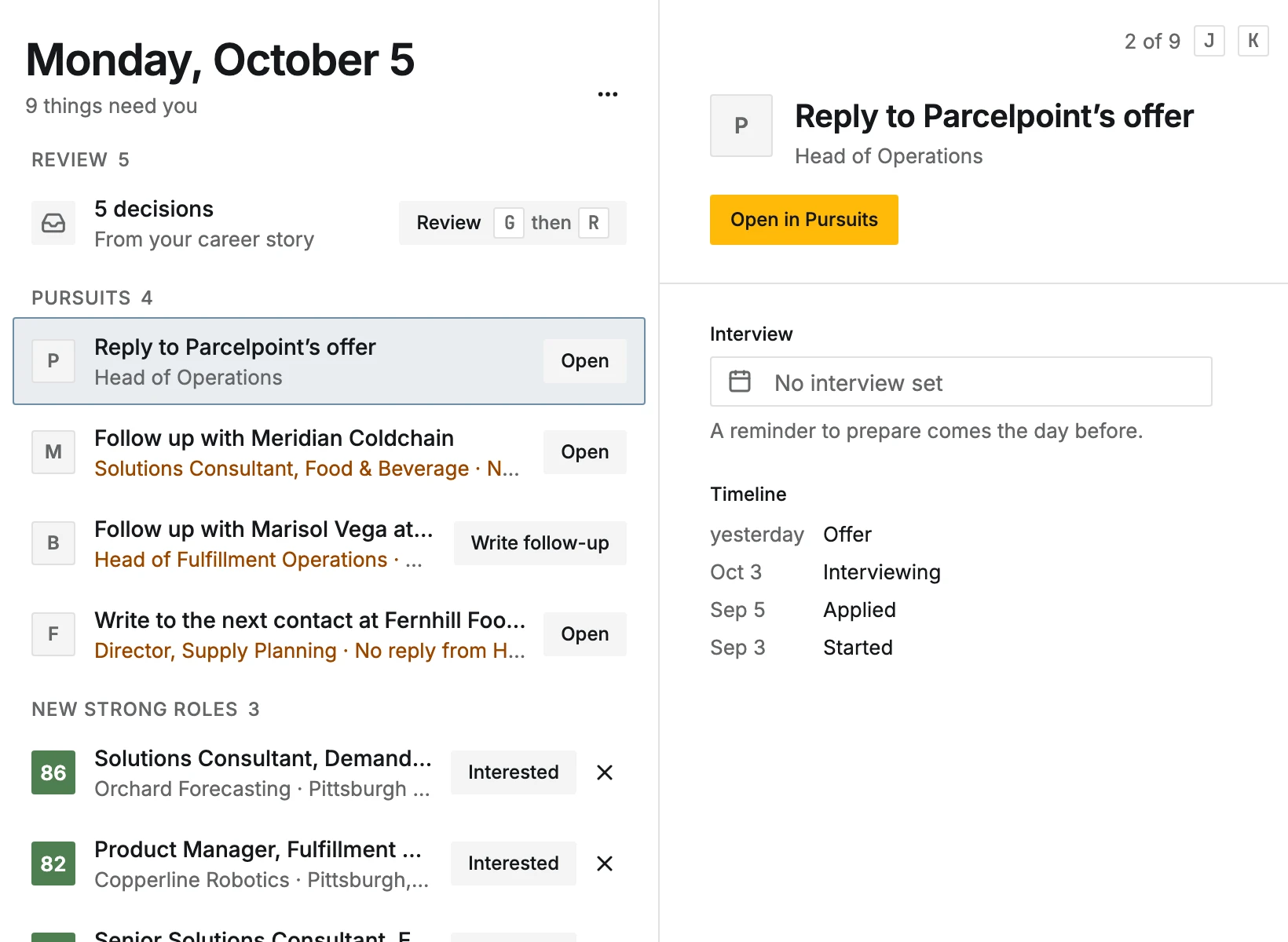
The top says the date and how many things need you, or Nothing needs you. The lines come in groups:
- Review
- How many decisions wait, with the first groups. Opening it takes you to Review.
- Pursuits
- Each pursuit with a reminder due: Follow up when an application goes quiet, prepare for an interview, reply to an offer, or Check in on one that hasn't moved.
- New strong roles
- Roles ranked a strong fit for one of your directions in the last week that you haven't rated or started. Interested keeps one in mind, Not for me sets it aside (with why, if you like), Start begins a pursuit.
- Resumes
- A resume with a new version to keep or discard (Keep, Discard), or one whose record changed since it was written (Rewrite, with its cost).
- Working
- Work running in the background right now. The same list is in Activity.
On careerbot.dev, when this month's AI allowance is used up, a note above the list says so, with Ask for more and Add your own key. See CareerBot's AI on careerbot.dev.
Work through it
- 1
Open a line
Click a line, or move with J and K and press ↵. It opens beside the list: the pursuit, the role or the resume update. Esc closes it.
- 2
Act on it
A reminder has its done button (for example Write follow-up on a quiet application) and Snooze, which hides it until the day you pick (Snooze until). A strong role has Start, Interested and Not for me. A resume has Keep, Discard or Rewrite.
- 3
Go further
Open in Pursuits or Open in Resumes takes you to the full item.
Undo is offered in the message after each action, and U undoes the last one.
Large screens and phones
On a large screen the list is wide on the left and the open line sits beside it. On a phone the list shows alone; a line opens full screen with a way back, and its actions move to the bottom bar. See On a phone.