Tailoring a resume
A resume written for one posting, from your direction's resume, with how well you cover each requirement.
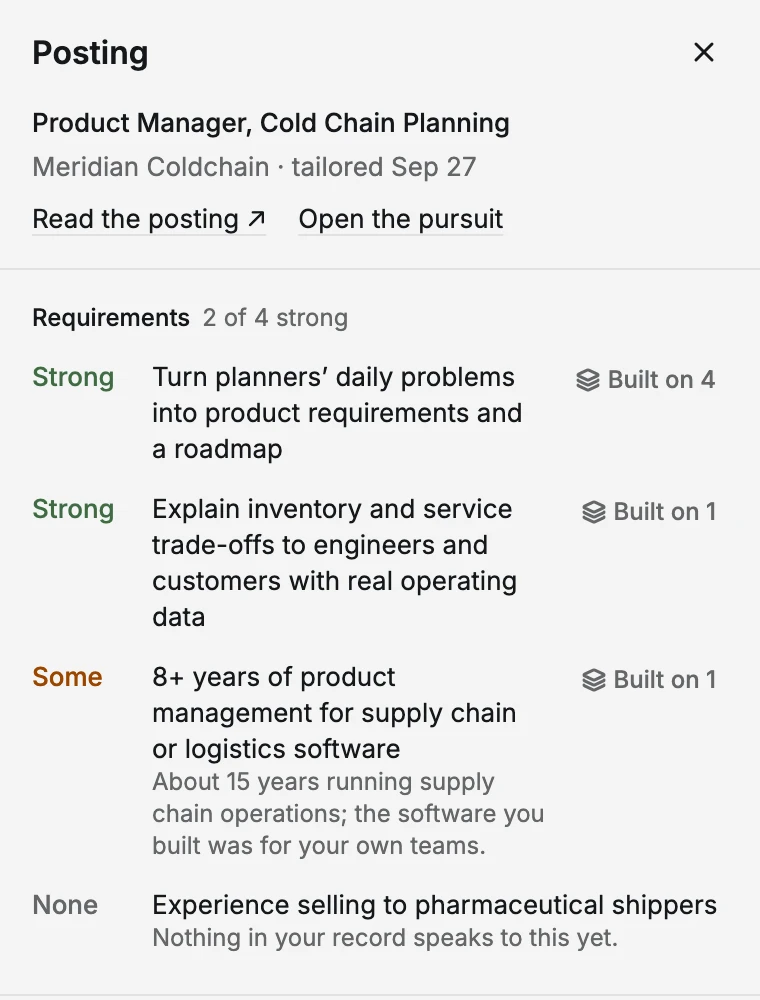
A tailored resume is written for one posting. It starts from your resume for the role's direction and bends it toward what the posting asks for, using only your approved record. Next to it you get a requirements map: how well your record covers each requirement in the posting.
What you do
- The step's button, Open the resume, opens your pursuit at its Resume tab.
- Choose Tailor a resume. The estimate shows first; it uses your AI budget. If you don't have a resume for that direction yet, it's written first in the same run.
- When it's done, the step shows how many requirements it covers strongly, such as "Tailored · covers 7 of 9 requirements".
- Read it through and edit any line you couldn't talk to in an interview.
If the button isn't there, the role fits no approved direction: "Approve a direction this role fits to tailor a resume to it."
Tailor it again writes a new version; earlier versions stay. Once you mark the pursuit Applied, the resume is kept exactly as sent.
See Resumes.
Next
Two paths: Outreach and Apply.
Edit this page on GitHub