The outreach message
Reveal one email, draft a short message from your record, send it from your own email with your resume, and mark it sent.
The second step on the Outreach path: a short message to one person, in your own words and from your own email. CareerBot never sends anything for you.
What you do
- 1
Reveal one email
On the pursuit's People tab, emails stay hidden until you choose. Reveal email beside the one person you'd write to costs 1 Apollo credit. Once revealed, it's never paid for again, also when the same person turns up for another pursuit. If Apollo has no email for them, it says so. Someone you added yourself already has the email you typed.
- 2
Draft a message
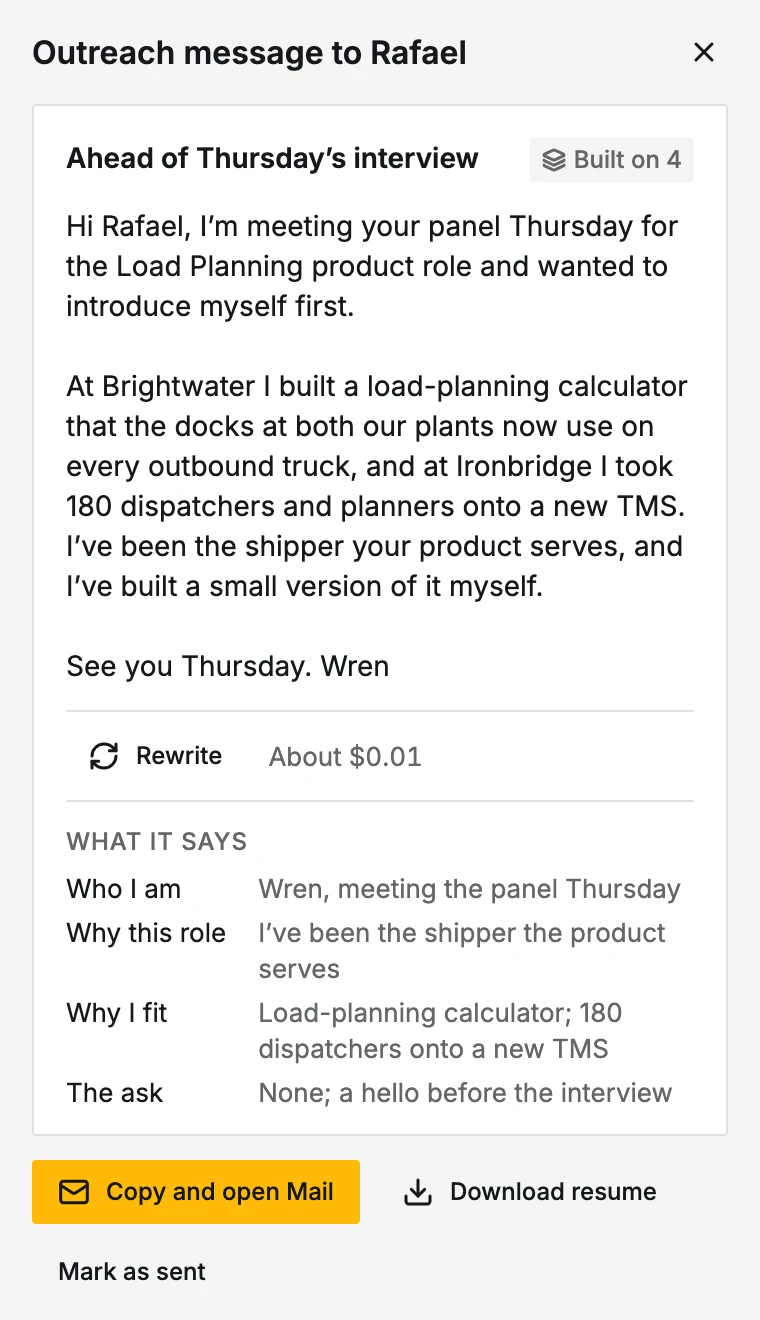
Open that person and choose Draft a message. It's written from your approved record and this role in four parts: who you are, why this role, why you fit (with the facts it rests on), and one small ask that suits the person's group. What it says sums up each part. Rewrite writes another. Each uses a little of your AI budget.
- 3
Send it yourself
Copy and open Mail copies the message and opens it in your email, addressed and ready to send. An email draft can't carry a file, so Download resume beside it saves your tailored resume as a PDF to attach.
- 4
Mark it sent
After you send it, choose Mark as sent. It's kept on the pursuit's timeline, and the first one sets the pursuit to Contacted.
The step is done once a message is marked sent.
A few thoughtful messages
Write to one person at a time, at most three per pursuit, with one follow-up each. Each message knows who else you wrote to there and whether you applied, so no two people get the same note. When someone answers, Mark a reply on People keeps it and moves the pursuit to In conversation.