Goals, directions and limits
How your goals story becomes directions and limits, and every setting that filters or ranks companies and roles.
Your goals say what you're looking for. CareerBot turns them into two things you approve: directions (the kinds of work you're going for) and limits (the lines you draw). Together they decide where CareerBot looks, what it hides and how it ranks.
Goals are explicit
Three rules hold everywhere:
- Only what you say to avoid is excluded: an industry you avoid, a firm limit, or a past employer. Nothing is left out because you didn't mention it.
- A wanted list seeds; it doesn't cap. Industries, company types or titles you want tell CareerBot where to look first and what to rank higher. It may add related ones, marked as its suggestion, so you aren't boxed in when you're not sure where you fit.
- Every rule that filters or ranks is a setting you can see and switch. They're all listed on this page, under Settings that filter or rank.
The goals story
In Goals, you write your goals the way you write a job story: what you want next, what you're done with, pay, place, travel, the companies and work you'd rather avoid. Each save is a new version, and every version is kept.
Read my goals reads the newest version against your approved record and proposes limits and directions. They wait in Review and in Goals under To review. After you change the story, Read my goals again proposes what's new. A limit or direction you rejected, with why, isn't proposed again.
See Writing your goals for how to write it.
Directions
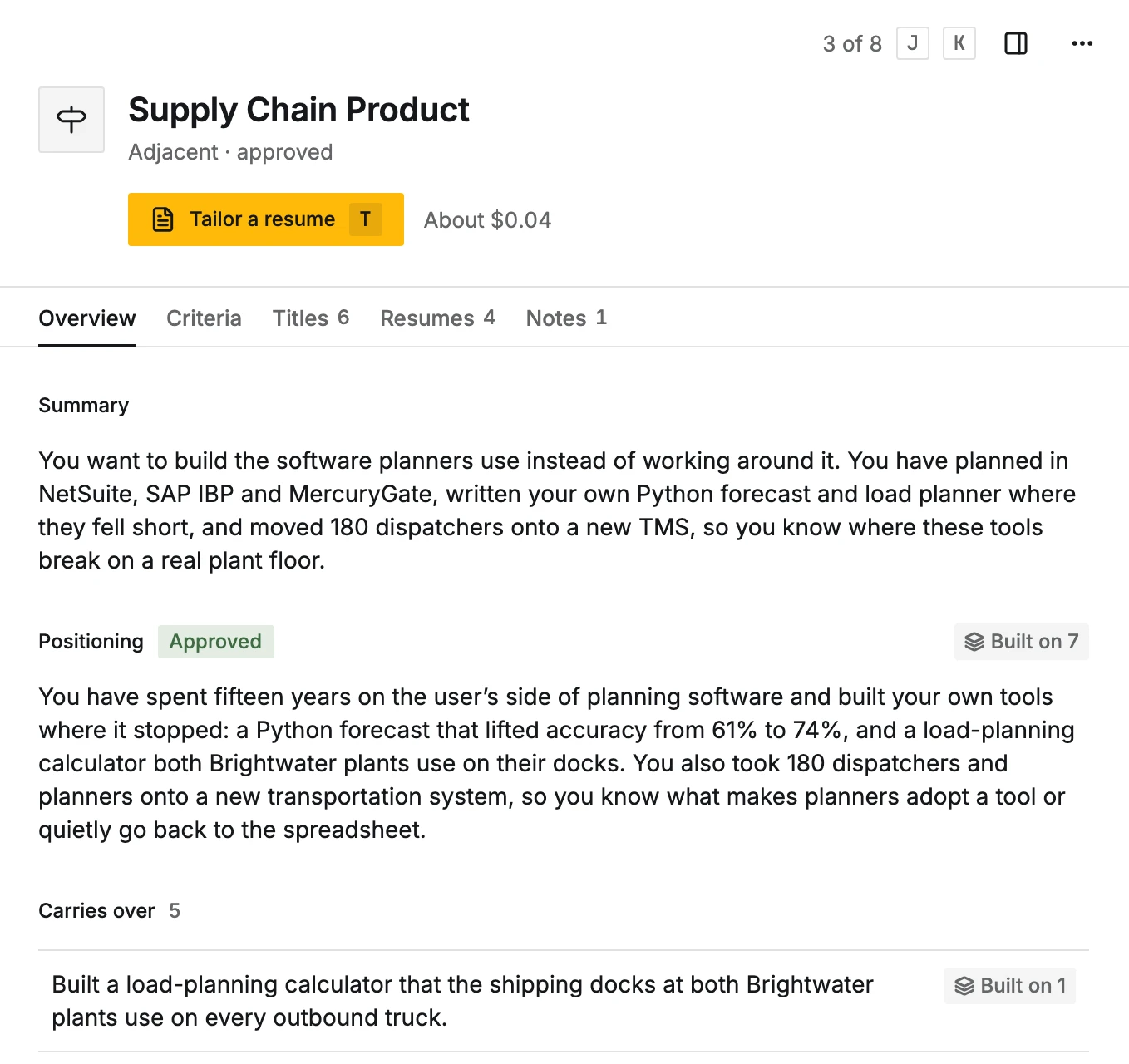
A direction is one kind of work you're going for, such as "Supply Chain Product" or "Supply Planning". Each has:
- Path
- How close it is to what you do now: Current (the work of your current role), Adjacent or Stretch. It's used for ranking and positioning only, never as a filter.
- Covers
- The related titles or kinds of work it takes in, read from your goals (or added when you merge one direction into another).
- Fit with your record
- Why your approved record supports it.
- What it is
- The work in plain words.
Approving a direction adds it to your goals: roles are ranked for it, and if nothing is filled in yet, its positioning, titles and search criteria are filled in on their own, for you to review. That is AI work: Approve says about what it costs before you click, it runs within your AI budget and shows in Activity. Several approved one after another are filled in by one pass, one direction at a time. Rejecting it (with why, if you like) keeps it from being proposed again. Suggest more proposes kinds of work your approved record supports that you haven't considered; they wait under Proposed, marked "Suggested from your record".
Positioning
For each approved direction, CareerBot proposes how to present you for it, from your approved record:
- Positioning: the case for you in this kind of work.
- Target titles: the titles to aim at.
- Market vocabulary: the words this market uses for what you've done.
- Carries over and Reframe: the parts of your record that carry straight over, and the ones to describe in this market's terms, each citing approved facts.
Approving the positioning lets resumes for that direction use it. A direction resume can't be written until it's approved.
Criteria
The criteria are what company search looks for in this direction: Titles, Industries, Company sizes, Stages, Keywords and Companies you like (companies to find more like: the companies you like in Search settings, for every direction, and any added for this direction only). Approving them opens company search for the direction. If the criteria name an industry your limits avoid, the form says so: take it out, or search won't look there.
When your company limits name industries you want, Industries shows them first, under From your goals, for every direction (or for this direction, when the limit is scoped to it). They come from your limits each time, so changing a limit changes every direction at once, and every search for the direction covers them. Below come the direction's own industries your goals don't name, under From your record, not in your goals: often an industry you worked in before. Search covers them too; take them out in Edit if you don't want them.
Titles lists the names companies actually post for this work at your level, usually 10 to 20: seniority and scope variants (Senior, Lead, Principal; Enterprise, Strategic, Named Accounts; Founding) and the other names used for the same work, never a level or kind of work your limits rule out. Company searches for companies hiring now use the first 10; the job-board searches the first 2.
Once approved, positioning and criteria are never overwritten. Fill in again proposes new ones only for the parts you haven't approved.
Limits
A limit is one line you draw, in your own sentence, with a rule CareerBot can check against a job posting. Every limit has a kind:
Pay
- MinimumA number
- MaximumA number
- CurrencyUSD, EUR, GBP, CAD, AUD
- PerYear, Hour
- CountsBase, Total (base = salary only; total = base + bonus + commission)
- Bonus or commission fineYes or no
Location
- Ways of workingRemote, Hybrid, Onsite
- CountriesCountries
- NearPlaces, with a distance (for hybrid or onsite)
Travel
- Least travel (%)A number
- Most travel (%)A number
Schedule
- Most hours a weekA number
- Full-timeYes or no
Seniority
- LevelsIndividual contributor, Lead, Manager, Senior manager, Director, Senior director, VP, SVP, C-level, Founder
- Never these levelsIndividual contributor, Lead, Manager, Senior manager, Director, Senior director, VP, SVP, C-level, Founder
Companies
- Never these employersCompany names
- Industries wantedAI, Aerospace and defense, Robotics, Hardware and semiconductors, Energy, Industrial, Developer tools, Data infrastructure, Security, Fintech, Healthcare, Real estate, Proptech, E-commerce, Media, Education, Government, Consulting, Staffing, Other
- Industries avoidedAI, Aerospace and defense, Robotics, Hardware and semiconductors, Energy, Industrial, Developer tools, Data infrastructure, Security, Fintech, Healthcare, Real estate, Proptech, E-commerce, Media, Education, Government, Consulting, Staffing, Other
- Company sizes (people)1-10, 11-50, 51-200, 201-1000, 1001-5000, 5001+
Work
- WantedCold calling, Outbound prospecting, Account management, Closing deals, Quota carrying, People management, Customer support, Implementation, Onboarding, Solution design, Product demos, Partnerships, Process design, Internal tooling, Analytics, Writing, On-call
- AvoidedCold calling, Outbound prospecting, Account management, Closing deals, Quota carrying, People management, Customer support, Implementation, Onboarding, Solution design, Product demos, Partnerships, Process design, Internal tooling, Analytics, Writing, On-call
Eligibility
- CitizenshipCountries
- Security clearance you holdNone, Public Trust, Secret, Top Secret, TS/SCI
- You need visa sponsorshipYes or no
How firm
- Firm hides roles that fail it.
- Preference keeps them, ranked lower.
A role that doesn't say (no pay listed, no travel stated) is never counted against you.
Where and when it applies
- Applies to: every direction (the default), or only the directions you choose. A limit for some directions replaces the every-direction limit of the same kind there.
- Only when: Always, or only When changing industry or When changing kind of work. A conditional limit is an exception that loosens: while its condition holds, a role passes if it meets either the general limit or the exception.
Two limits clash when both can't hold: the same kind and Only when, for the same directions, setting the same rule field to different values (two pay floors, two seniority ranges, two places to work). Work and Companies limits never clash: several of them add up. A clashing limit says Clashes with the other, why, and what each does to your roles, with Edit on the other one and Keep both, which stops marking the pair until either one changes. The mark goes as soon as either is changed, rejected, switched off or deleted.
The sentence and the rule
The rule is read from your sentence. If you edit the sentence later, the limit shows "You changed the sentence after this rule was set", and you can read the rule again from the new wording or keep the rule you have. You can also edit the rule's values directly. Add a limit adds one of your own, approved as you save it.
What limits do
- Location
- Roles that name only other countries aren't listed at all, and remote roles only count if your limit allows remote. A role that names no country is kept. Company job counts follow the same area. A role that states it's on-site or hybrid somewhere outside a firm location limit, or remote when you don't work remotely, moves to Against your limits in Pursuits with the reason; one that doesn't say how or where is kept.
- Pay
- A role that states its pay in US dollars, topping out below a firm limit's minimum (counted by the year), moves to Against your limits in Pursuits with the reason. A limit that doesn't say whether it counts base or total compensation counts as base pay. A posted range doesn't say which it is, so a limit on total compensation never sets a role apart. A role with no pay stated, only a starting figure ("from $120k"), or pay in another currency, is kept.
- Seniority, travel and schedule
- A role that states a level outside a firm seniority limit, more (or less) travel than a firm travel limit allows, or part-time or full-time against a firm full-time choice, moves to Against your limits with the reason. Hours a week aren't stated on roles, so judging weighs them.
- Companies
- Industries you avoid are never searched. Employers you exclude, and your past employers, are dropped from every search; a role at an employer a firm limit excludes moves to Against your limits. Industries, company sizes and the work itself aren't stated in a role's details, so judging weighs them.
- Eligibility
- Checked against what each role states: a role needing a higher clearance than you hold, or not sponsoring a visa when you need one. Against a firm limit, the role moves to Against your limits in Pursuits; against a preference, it ranks lower.
- Every limit
- Ranking reads your approved limits. A role that fails a firm limit is ranked none; one that misses a preference counts as more of a stretch, while stretch is counted (below).
Every limit has a switch. Switched off, it's kept and shown, but nothing filters or ranks by it until you switch it on. Undo approval puts it back with the proposed limits; nothing filters by it until you approve it again.
Settings that filter or rank
These are all the switches that change what you see or the order you see it in.
Industries you want
In Companies, ⋯ > Search settings.
| Choice | What it does |
|---|---|
| Steer (the default) | Searches start with your wanted industries and add related ones. A search for companies hiring now is steered into them, added alongside the rest, never narrowing. |
| Only these | Searches stay inside your wanted industries, lookalike searches too. |
| Ignore | Industry doesn't shape searches. |
Industries you avoid, and your past employers, are excluded whichever you choose.
Check companies against your goals
Also in Search settings. When it's on, filling in a company also judges it against your approved company goals: fits, partly, doesn't, or can't tell, with a reason. For well-known companies it may use general knowledge, labelled as such.
| Choice | What it does |
|---|---|
| Off | Companies aren't checked against your goals. |
| Rank (the default) | Ones that fit your goals rank higher in Found. |
| Hide | Ones that don't fit move to Doesn’t fit your goals, under Set aside, where you can keep them. |
This judgment is a signal, not a verdict. Keep anyway brings a company back, and companies you like yourself are never set aside. Your own rating is the final say. After you change your goals or directions, Check all again judges every company again, at about a cent for every 40 companies.
Learn from your ratings
A switch in Search settings. When on, Targets seed searches for the directions they fit, and companies you said Not for me aren't found again. What you turned down, and why, weighs against similar companies and roles, never as a limit. It costs about 1 Apollo credit a search for every 5 targets, from the next search and check.
Update fit as roles change
A switch in Search settings, on by default. Each read of a company's board by the daily roles check (or Check roles again) brings its open roles, remote roles and roles matching your directions' titles up to date, for free. When a matching role opened or closed, the company's fit for your directions is judged again, a batch of up to 15 companies at a time, at about a cent for every 40 companies from your AI budget. Activity shows it as "Updating company fit for 3 companies". A board searched by your titles, or read only in part, adds the matching roles it finds and never counts a role it didn't see as closed. Off: the counts still follow each read, and a company's fit stays as it was until you Check again.
Job postings from Apollo
A switch in Settings, Connections, under Companies. When a company has no public job board, CareerBot asks Apollo for its postings: about 1 Apollo credit per company, while Automated Apollo work is on.
Sorting roles
In Settings, under AI. New roles are sorted into your directions before they're ranked; a role sorted into none of them isn't ranked and goes under Other roles ("Not the work of your directions"). Sorting leans toward including. What sorts is the Sorting roles task's model: the main model, or one of its own, a chat model or a decision model such as Jev or Liquid's d1.
Count how big a stretch a role is
In the ⋯ menu on Pursuits, on by default. When on, a role's level (strong, some, weak or none) still says only how well the work fits, but its score is lowered for the stretch: years asked beyond your years of work, seniority well above yours, core requirements your record lacks, and preferences it misses. The stretch is listed with the role in a few plain words. A stretch lowers a score; it never hides a role. When off, scores stay inside their level and gaps don't lower them. A change applies to roles ranked from then on; Rank again ranks the rest.
Filters on roles
Pursuits' filters narrow the list you see without changing any ranking: Score at least, Pay at least, place, Work setup, Posted within, Company (all, Targets, Maybes or chosen ones), Seniority, Years asked, Employment type, Rating, Travel, Clearance and Visa sponsorship. A role that doesn't state something you filter on is kept. Rating starts at All but Not for me. Firm eligibility limits start the page with their filters set: the clearance you hold, and only roles that sponsor a visa.
Your ratings
Target, Maybe and Not for me on a company decide whether its roles are read at all: only Targets and Maybe companies have their roles read, Targets ranked first. Not for me on a role sets it aside with your reason. See Companies and roles.
Edit this page on GitHub